Back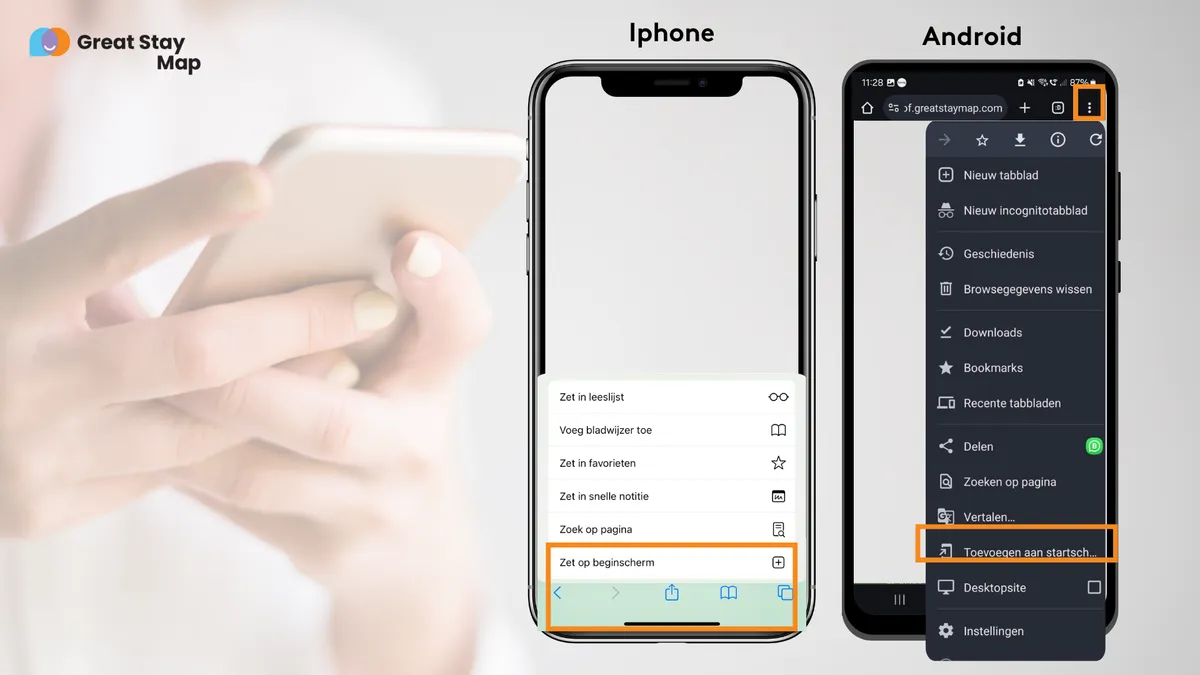
Welcome to our new webapp. Scroll down and click the info you're looking for!
Save as app icon
All information always at hand
Want to be able to find all the information easily during your stay, without having to look up the url every time? Then save this website as an app. With één press of a button you will then have access to all tips and information.
Step-by-step: Saving web app on your home screen
For iPhone (Safari)
- Open the website in the Safari browser.
- Press the three dots at the bottom right of your screen
- Put in Bookmarks
- Open a new tab
- Press the three dots at the bottom right of your screen
- Open bookmarks
- Open tab
For Android (Chrome)
- Open the website in the Chrome browser.
- Tap the three dots: They are in the upper right corner.
- Tap "Add to home screen."
- Confirm: Tap "Add. The icon will now automatically appear on your home screen.